MEWS gives veterinarians 101 minutes back every day · See it in your clinic → One platform replaces your whole stack · Everything inside → Migrate in 45 days, for $0 · How switching works →
MEWS Pay

Checkout that closes itself.

The invoice builds from the treatment plan while the visit is still happening. The client pays in the room, online, or in the app — and it all lands in one ledger.

app.meetmews.com / pay ● ACCEPTING PAYMENTS
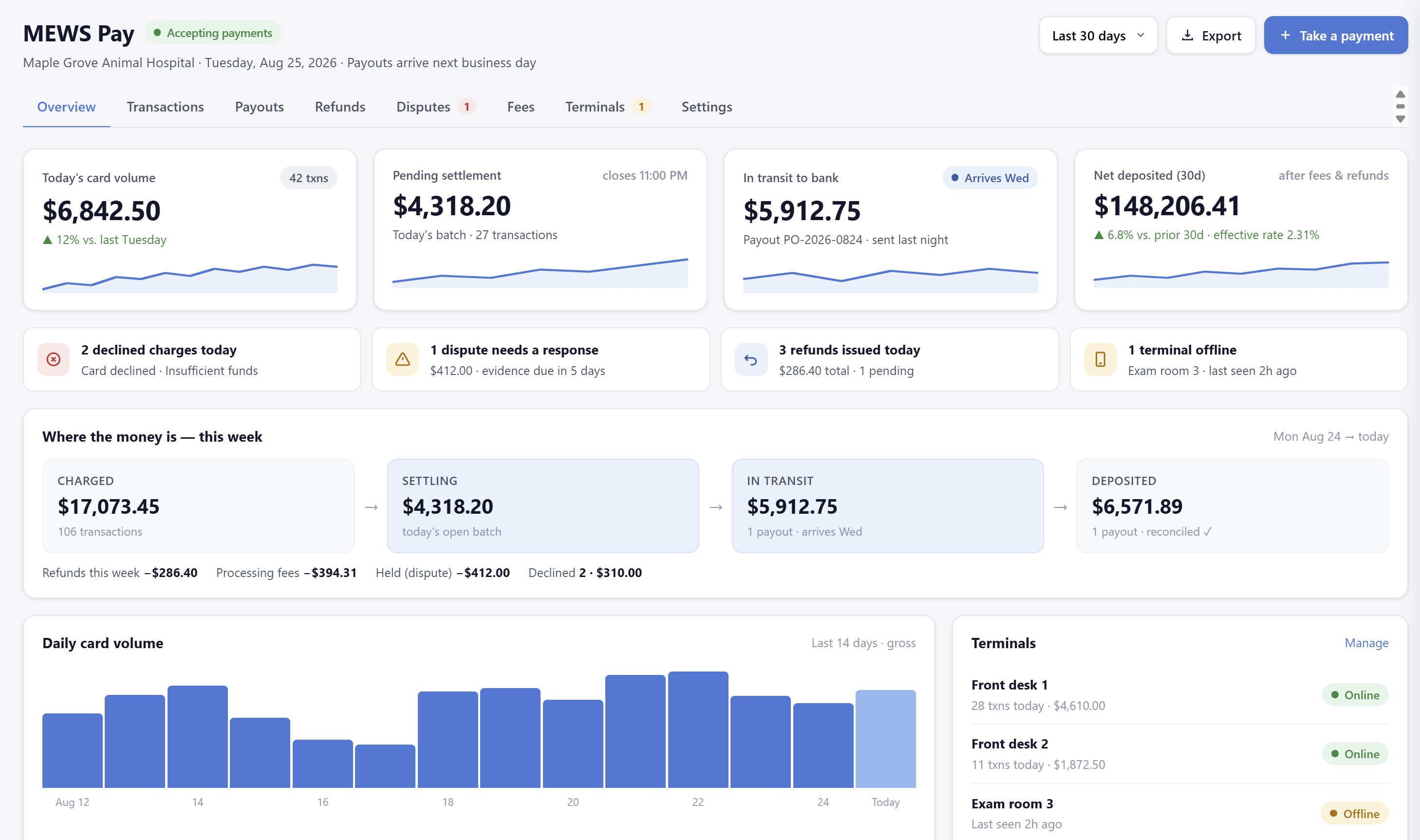
MEWS Pay overview — today's card volume, pending settlement, in-transit payout, net deposited, and the where-the-money-is pipeline

The MEWS Pay overview — one screen answering the question every owner asks: where is today's money?

The invoice writes itself

Every item in the plan — exam, vaccines, meds, labs — is priced and coded as you work. No end-of-day charge capture, no missed items.

Every way to pay

Tap-to-pay terminals in the room, payment links by text, the owner app, and stored cards for refills. Deposits arrive next business day.

Reconciles in minutes

One ledger across terminals, online, and app payments — matched to invoices automatically. End-of-day goes from an hour to a glance.

Where the money is

Every dollar, visible at every stage.

From the tap at checkout to the line on your bank statement, money moves through four states — and you can see all of them, all the time.

1 · Charged
Card tapped at checkout
In the room, by link, or in the owner app.
2 · Settling
Today's batch, closed nightly
Weekend batches roll into Monday automatically.
3 · In transit
One payout, one deposit
Numbered, tracked, with an expected arrival date.
4 · Deposited
Next business day
The net matches your bank statement to the cent.

Each payout is one bank deposit, and it appears on your statement as MEWS PAY — YOUR CLINIC. No mystery lump sums.
Payouts & reconciliation

Month-end in a glance, not an afternoon.

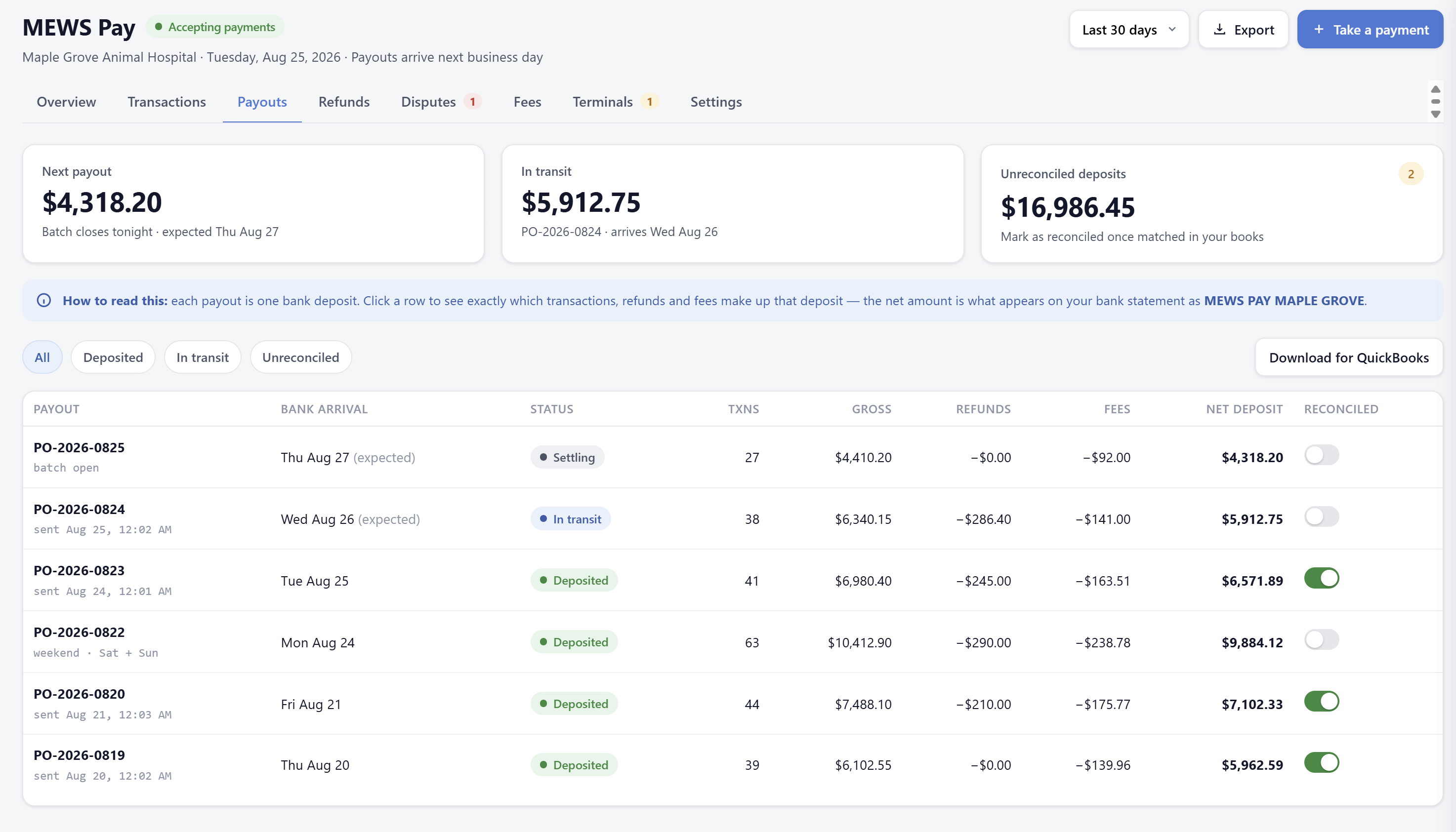
  • Click any payout to see exactly which transactions, refunds, and fees make up that deposit.
  • Mark deposits reconciled as you match them in your books — unreconciled ones stay flagged until you do.
  • Download for QuickBooks in one click, or export any date range for your accountant.
  • Gross, refunds, fees, net — itemized per payout, so nothing needs decoding at tax time.
app.meetmews.com / pay / payouts
MEWS Pay payouts — each bank deposit itemized with transactions, refunds, fees, net amount, and reconciliation toggles
app.meetmews.com / pay / terminals
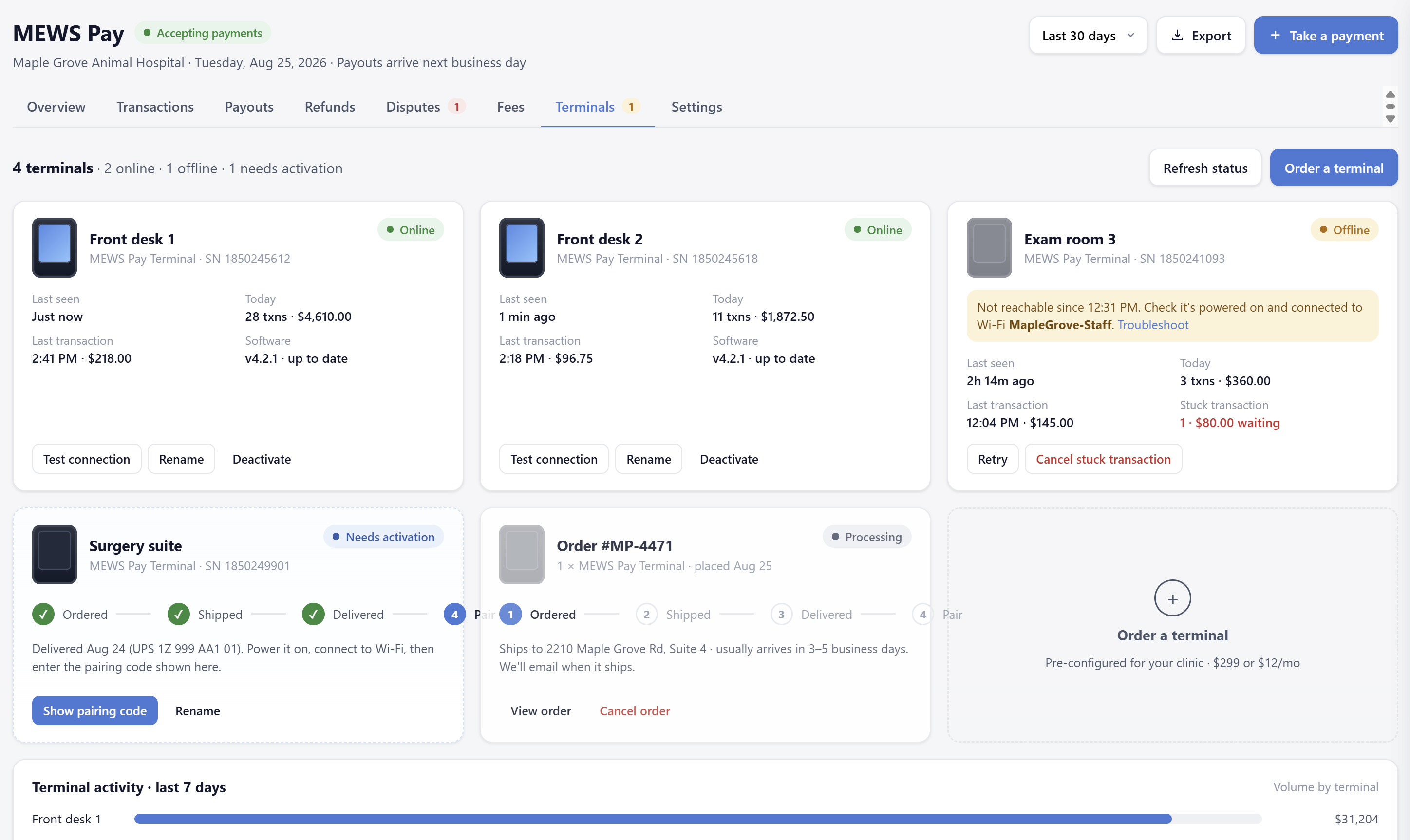
MEWS Pay terminals — fleet status per room, per-terminal volume, pairing flow, and one-click terminal ordering
Terminals

A terminal in every room, managed from one screen.

  • Live fleet status — every terminal's connection, today's volume, and last transaction, room by room.
  • Pre-configured for your clinic — order from the dashboard, power it on, enter a pairing code. Minutes, not a support ticket.
  • Simple hardware pricing — buy or rent per terminal, no leases, no third-party processor hardware contracts.
  • Self-healing workflows — offline alerts with troubleshooting, and stuck transactions you can retry or cancel yourself.
Nothing slips

The exceptions find you.

Declined charges

Flagged the moment they happen, with the reason — so the front desk retries before the client leaves.

Disputes

Every dispute shows its amount and evidence deadline. Submit your response from the same screen.

Refunds

Issued from the invoice, tracked to the payout they come out of — the client and your books always agree.

Offline terminals

If a terminal drops off Wi-Fi, you know before the next client is standing at checkout.

Recurring revenue, billed automatically

Membership plans that charge themselves.

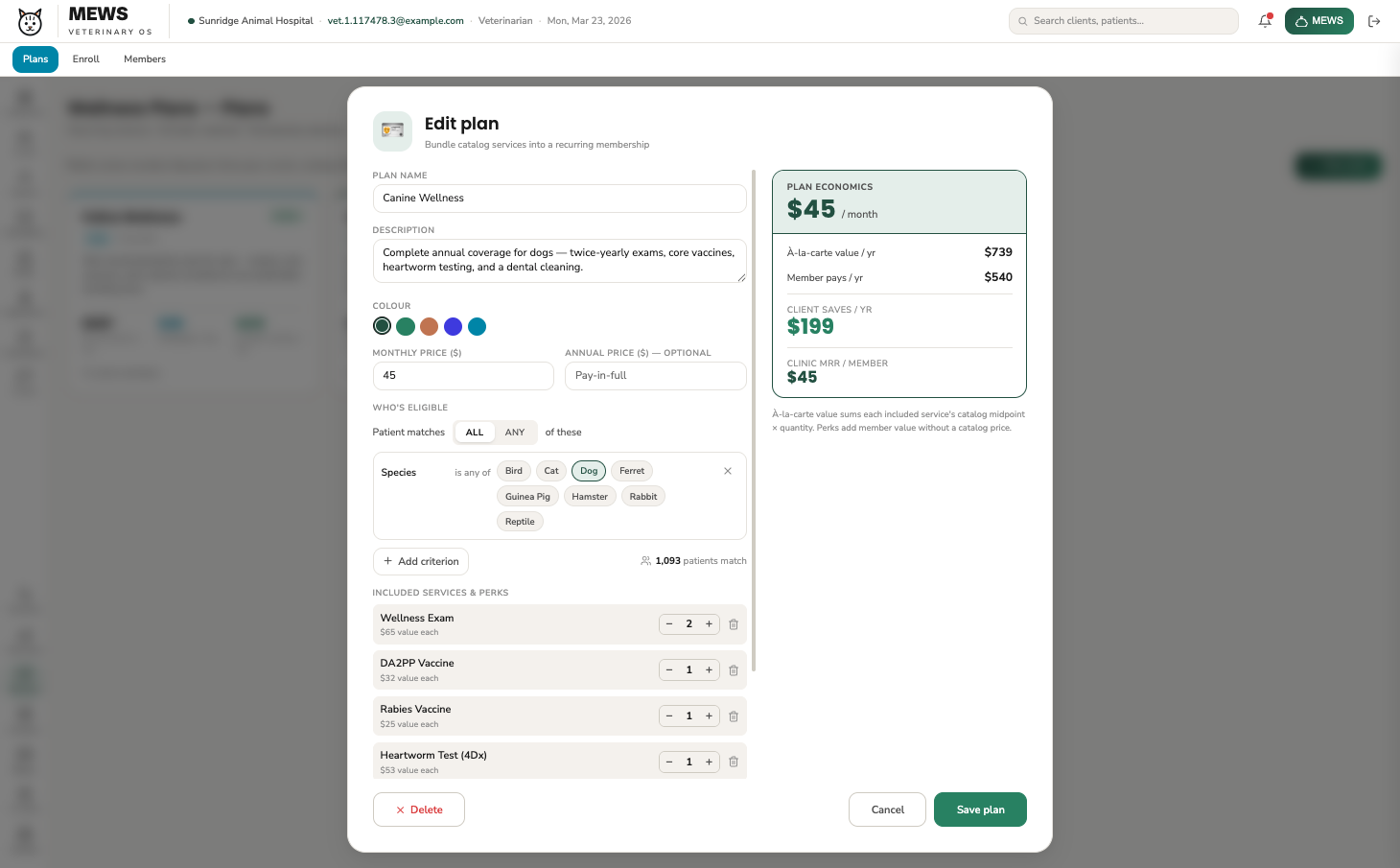
Build a plan from your own catalogue and MEWS prices it as you go — à-la-carte value, what the member pays, what they save, and your monthly recurring revenue per member. Then MEWS Pay bills every member on schedule.
app.meetmews.com / wellness / plans ● PLAN ECONOMICS
MEWS plan editor — included services, eligibility rules, and live plan economics showing member price, client savings, and clinic MRR per member
The part clinics love

On MEWS Pay, the software costs less.

Run card processing through MEWS Pay and you get our best software rate — meaningfully lower, every month, on every DVM. And we match your existing card processing rates, so switching costs nothing.

See how it nets out
  • No change to what your clients pay.
  • We match your existing card processing rates — switching costs nothing.
  • PCI-compliant, with chargeback support handled by our team.
FAQ

Money questions, straight answers.

01When does the money arrive?
Next business day. Each night's batch becomes one numbered payout with an expected arrival date, and weekend batches roll into Monday's deposit automatically.
02What shows up on my bank statement?
One line per payout, labeled MEWS PAY with your clinic's name, for the exact net amount shown in the dashboard. Click the payout to see every transaction, refund, and fee inside it.
03Does it work with QuickBooks?
Yes — download any range of payouts formatted for QuickBooks in one click, with gross, refunds, and fees itemized per deposit. Reconciliation toggles keep track of what you've matched.
04What does processing cost?
We match your existing credit card processing rates, so moving to MEWS Pay costs nothing — and your effective rate is always visible on the dashboard. Clinics on MEWS Pay also get our best software rate. See pricing.See how it nets out.

Stop chasing charges. Start closing visits.

We'll model your processing volume and show you what MEWS Pay saves — and credits — in year one.

Book a demo